Service Token API
The AutoROICalc service token is used for API-based integrations. It lets trusted systems create or manage records through the AutoROICalc API, which is useful for custom backends, scheduled jobs, server-side conversions, and internal automation.
When to Use the Service Token
Use the service token when you want to:
- Send records from a backend service
- Import data from a custom system
- Connect automation tools or internal scripts
- Build a server-side data pipeline
- Use the Records API instead of manual imports
- Retrieve an authenticated report widget or its calculated chart data
Create a Connection Token
Open the AutoROICalc Integrations page and create a named service-token connection for the website, server, or automation that will use it. Select only the permissions that integration needs.
The complete secret is displayed once. AutoROICalc stores its hash and later shows only the recognizable token prefix. If a token is exposed or an integration is retired, revoke that connection without interrupting other applications.
Available permissions include:
| Permission | Allows |
|---|---|
records:write |
Create and update records. |
records:read |
Query records. |
reports:read |
List report and dataset information. |
widgets:render |
Retrieve authenticated report widgets. |
Older accounts may also show a legacy account-wide token. It remains available for backward compatibility, but new integrations should use separate connection tokens.
Authenticated account clients can manage connection tokens with these endpoints:
| Action | Endpoint |
|---|---|
| List connection tokens | GET /account/service-tokens |
| Create and reveal a token once | POST /account/service-tokens |
| Update its name, site, metadata, or permissions | PATCH /account/service-tokens/{token_id} |
| Rotate it with a 24-hour handover window | POST /account/service-tokens/{token_id}/rotate |
| Revoke it immediately | DELETE /account/service-tokens/{token_id} |
These management endpoints use the regular authenticated account session. The service-token secret itself cannot create, rotate, or revoke other credentials.
Protect your service token
Treat the service token like a password. Do not publish it in frontend code, public repositories, screenshots, or client-side JavaScript.
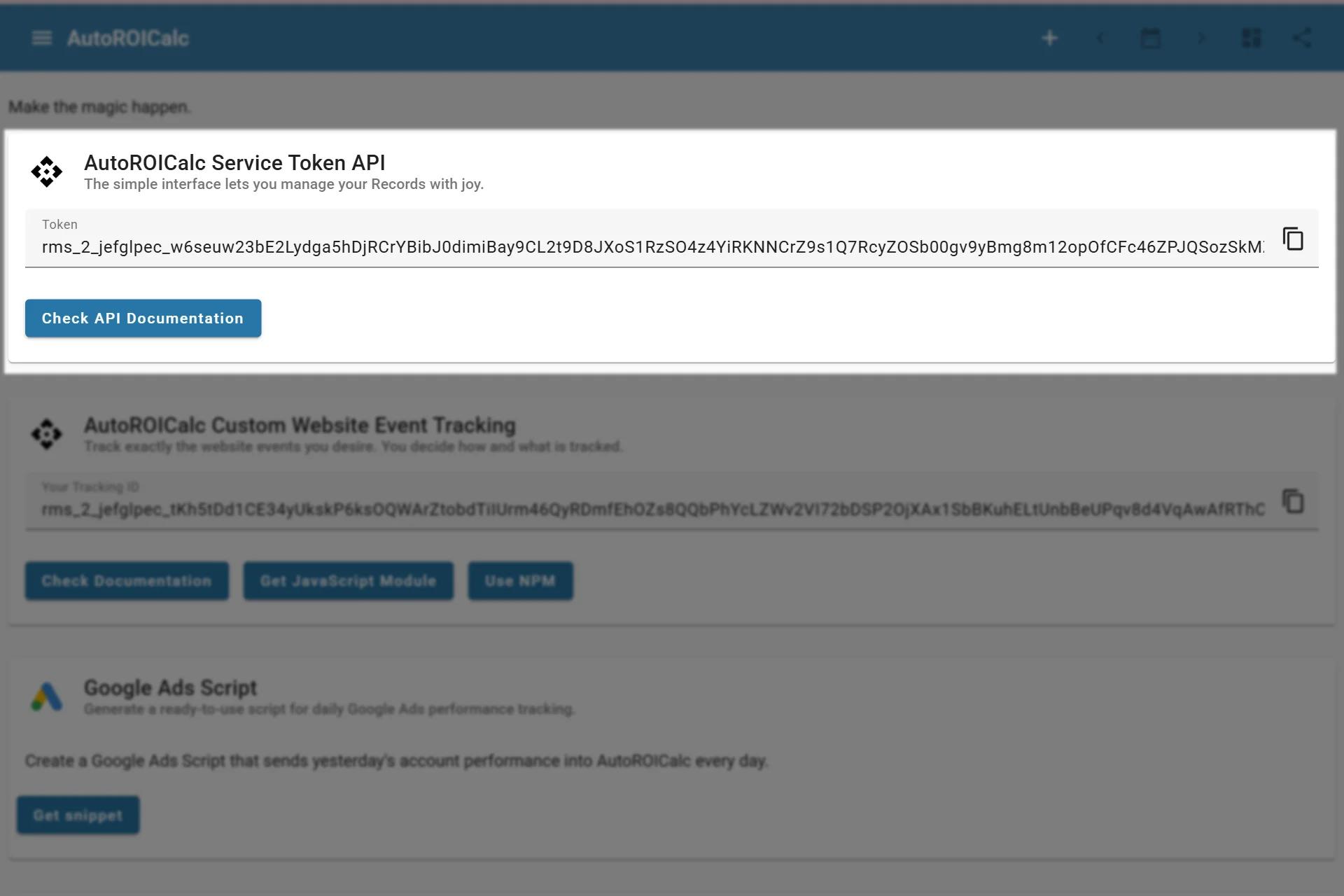
Finding the service token
Records API
Most custom integrations use the Records API to add records with fields such as type, description, date, source, tags, value, raw data, and custom data.
Records API Guide Records API Reference
Service Token Record Endpoints
Use service-token endpoints from trusted server-side code. Pass the credential in the X-Service-Token request header. The older service_token query parameter remains available for compatibility, but new integrations should use the header so the secret is less likely to appear in URLs and logs.
| Action | Endpoint | Purpose |
|---|---|---|
| Create one record | POST /service_token/record |
Adds a single record. |
| Create many records | POST /service_token/records |
Adds multiple records in one request. |
| Query records | POST /service_token/records/query |
Reads records with pagination and optional filters. |
| Update a record | PUT /service_token/record/{record_id} |
Updates an existing record by ID. |
| Get a report chart widget | GET /service_token/v1/reports/{report_id}/widgets/chart |
Returns widget HTML or a versioned JSON payload. |
| Get a saved report widget | GET /service_token/v1/reports/{report_id}/widgets/render?widgetId={widget_id} |
Renders a saved Data Value, Gauge, or Target widget as HTML or JSON. |
Keep service-token calls server-side
Do not call service-token endpoints from browser JavaScript or public mobile app code. Query parameters can appear in logs, analytics, proxies, and browser history, so only use the service token from trusted backend code, scripts, jobs, or private automation.
Report Widget API
The Report Widget API returns charts and saved Data Value, Gauge, and Target widgets to a trusted backend using the X-Service-Token header and the widgets:render scope. The report must have authenticated or public widget access enabled.
Use the dedicated guide for screenshot examples, access modes, HTML and JSON responses, public iframe embeds, and URL rotation.
Example Record Payload
The examples below create a record for a paid order. Adjust type, source, tags, value, custom_data, and raw_data to match your integration.
{
  "date": "2026-09-15",
  "time": "14:30:00",
  "type": "sale",
  "activity": "closed",
  "desc": "Order paid",
  "source": ["woocommerce"],
  "tags": ["ecommerce", "paid-order"],
  "value": 129.9,
  "custom_data": {
    "order_id": "100045",
    "customer_id": "8742",
    "campaign_id": "fall-2026"
  },
  "raw_data": {
    "provider": "woocommerce",
    "event": "order.paid"
  }
}
Create a Record Examples
curl -X POST "https://api.autoroicalc.com/service_token/record?service_token=$AUTOROICALC_SERVICE_TOKEN" \
  -H "Content-Type: application/json" \
  -d '{
    "date": "2026-09-15",
    "time": "14:30:00",
    "type": "sale",
    "activity": "closed",
    "desc": "Order paid",
    "source": ["woocommerce"],
    "tags": ["ecommerce", "paid-order"],
    "value": 129.9,
    "custom_data": {
      "order_id": "100045",
      "customer_id": "8742",
      "campaign_id": "fall-2026"
    },
    "raw_data": {
      "provider": "woocommerce",
      "event": "order.paid"
    }
  }'
<?php

$serviceToken = getenv('AUTOROICALC_SERVICE_TOKEN');
$url = 'https://api.autoroicalc.com/service_token/record?service_token=' . urlencode($serviceToken);

$record = [
    'date' => '2026-09-15',
    'time' => '14:30:00',
    'type' => 'sale',
    'activity' => 'closed',
    'desc' => 'Order paid',
    'source' => ['woocommerce'],
    'tags' => ['ecommerce', 'paid-order'],
    'value' => 129.9,
    'custom_data' => [
        'order_id' => '100045',
        'customer_id' => '8742',
        'campaign_id' => 'fall-2026',
    ],
    'raw_data' => [
        'provider' => 'woocommerce',
        'event' => 'order.paid',
    ],
];

$ch = curl_init($url);
curl_setopt_array($ch, [
    CURLOPT_POST => true,
    CURLOPT_HTTPHEADER => ['Content-Type: application/json'],
    CURLOPT_POSTFIELDS => json_encode($record),
    CURLOPT_RETURNTRANSFER => true,
]);

$response = curl_exec($ch);
$status = curl_getinfo($ch, CURLINFO_HTTP_CODE);
curl_close($ch);

if ($status < 200 || $status >= 300) {
    throw new RuntimeException('AutoROICalc request failed: ' . $response);
}

echo $response;
import os
import requests

service_token = os.environ["AUTOROICALC_SERVICE_TOKEN"]
url = "https://api.autoroicalc.com/service_token/record"

record = {
    "date": "2026-09-15",
    "time": "14:30:00",
    "type": "sale",
    "activity": "closed",
    "desc": "Order paid",
    "source": ["woocommerce"],
    "tags": ["ecommerce", "paid-order"],
    "value": 129.9,
    "custom_data": {
        "order_id": "100045",
        "customer_id": "8742",
        "campaign_id": "fall-2026",
    },
    "raw_data": {
        "provider": "woocommerce",
        "event": "order.paid",
    },
}

response = requests.post(
    url,
    params={"service_token": service_token},
    json=record,
    timeout=15,
)
response.raise_for_status()

print(response.json())
const serviceToken = process.env.AUTOROICALC_SERVICE_TOKEN;
const url = new URL("https://api.autoroicalc.com/service_token/record");
url.searchParams.set("service_token", serviceToken);

const record = {
  date: "2026-09-15",
  time: "14:30:00",
  type: "sale",
  activity: "closed",
  desc: "Order paid",
  source: ["woocommerce"],
  tags: ["ecommerce", "paid-order"],
  value: 129.9,
  custom_data: {
    order_id: "100045",
    customer_id: "8742",
    campaign_id: "fall-2026",
  },
  raw_data: {
    provider: "woocommerce",
    event: "order.paid",
  },
};

const response = await fetch(url, {
  method: "POST",
  headers: { "Content-Type": "application/json" },
  body: JSON.stringify(record),
});

if (!response.ok) {
  throw new Error(`AutoROICalc request failed: ${response.status} ${await response.text()}`);
}

console.log(await response.json());
#include <curl/curl.h>
#include <cstdlib>
#include <iostream>
#include <stdexcept>
#include <string>

int main() {
  const char* token = std::getenv("AUTOROICALC_SERVICE_TOKEN");
  if (!token) {
    throw std::runtime_error("AUTOROICALC_SERVICE_TOKEN is not set");
  }

  CURL* curl = curl_easy_init();
  if (!curl) {
    throw std::runtime_error("Could not initialize curl");
  }

  char* escapedToken = curl_easy_escape(curl, token, 0);
  std::string url = "https://api.autoroicalc.com/service_token/record?service_token=";
  url += escapedToken;
  curl_free(escapedToken);

  std::string payload = R"json({
    "date": "2026-09-15",
    "time": "14:30:00",
    "type": "sale",
    "activity": "closed",
    "desc": "Order paid",
    "source": ["woocommerce"],
    "tags": ["ecommerce", "paid-order"],
    "value": 129.9,
    "custom_data": {
      "order_id": "100045",
      "customer_id": "8742",
      "campaign_id": "fall-2026"
    },
    "raw_data": {
      "provider": "woocommerce",
      "event": "order.paid"
    }
  })json";

  struct curl_slist* headers = nullptr;
  headers = curl_slist_append(headers, "Content-Type: application/json");

  curl_easy_setopt(curl, CURLOPT_URL, url.c_str());
  curl_easy_setopt(curl, CURLOPT_HTTPHEADER, headers);
  curl_easy_setopt(curl, CURLOPT_POSTFIELDS, payload.c_str());

  CURLcode result = curl_easy_perform(curl);
  if (result != CURLE_OK) {
    std::cerr << "AutoROICalc request failed: " << curl_easy_strerror(result) << std::endl;
  }

  curl_slist_free_all(headers);
  curl_easy_cleanup(curl);
  return result == CURLE_OK ? 0 : 1;
}
Batch Records Example
Use POST /service_token/records when your integration can send several records at once. The request body is an array of record objects.
curl -X POST "https://api.autoroicalc.com/service_token/records?service_token=$AUTOROICALC_SERVICE_TOKEN" \
  -H "Content-Type: application/json" \
  -d '[
    {
      "date": "2026-09-15",
      "time": "14:30:00",
      "type": "sale",
      "activity": "closed",
      "desc": "Order paid",
      "source": ["woocommerce"],
      "tags": ["ecommerce"],
      "value": 129.9
    },
    {
      "date": "2026-09-15",
      "time": "15:10:00",
      "type": "lead",
      "activity": "open",
      "desc": "Pricing form submitted",
      "source": ["website"],
      "tags": ["lead", "pricing"],
      "value": 1
    }
  ]'