A visitor opens your website from a newsletter, browses your pricing page, and requests a demo. Keeping the traffic source alongside that event helps you understand where enquiries are coming from.
The AutoROICalc JavaScript tracking module, available as an npm package or a browser script, can capture traffic-source labels, keep a small browser-side source history, and include those sources in custom events.
What can you use it for?
- Lead-source reporting: associate confirmed enquiries or signups with captured marketing sources.
- Campaign comparisons: distinguish newsletter, paid-search, referral, or custom source labels.
- Backend handoff: include captured sources in your own form or CRM workflow instead of dropping that context when a lead is created.
Choose the source labels you want
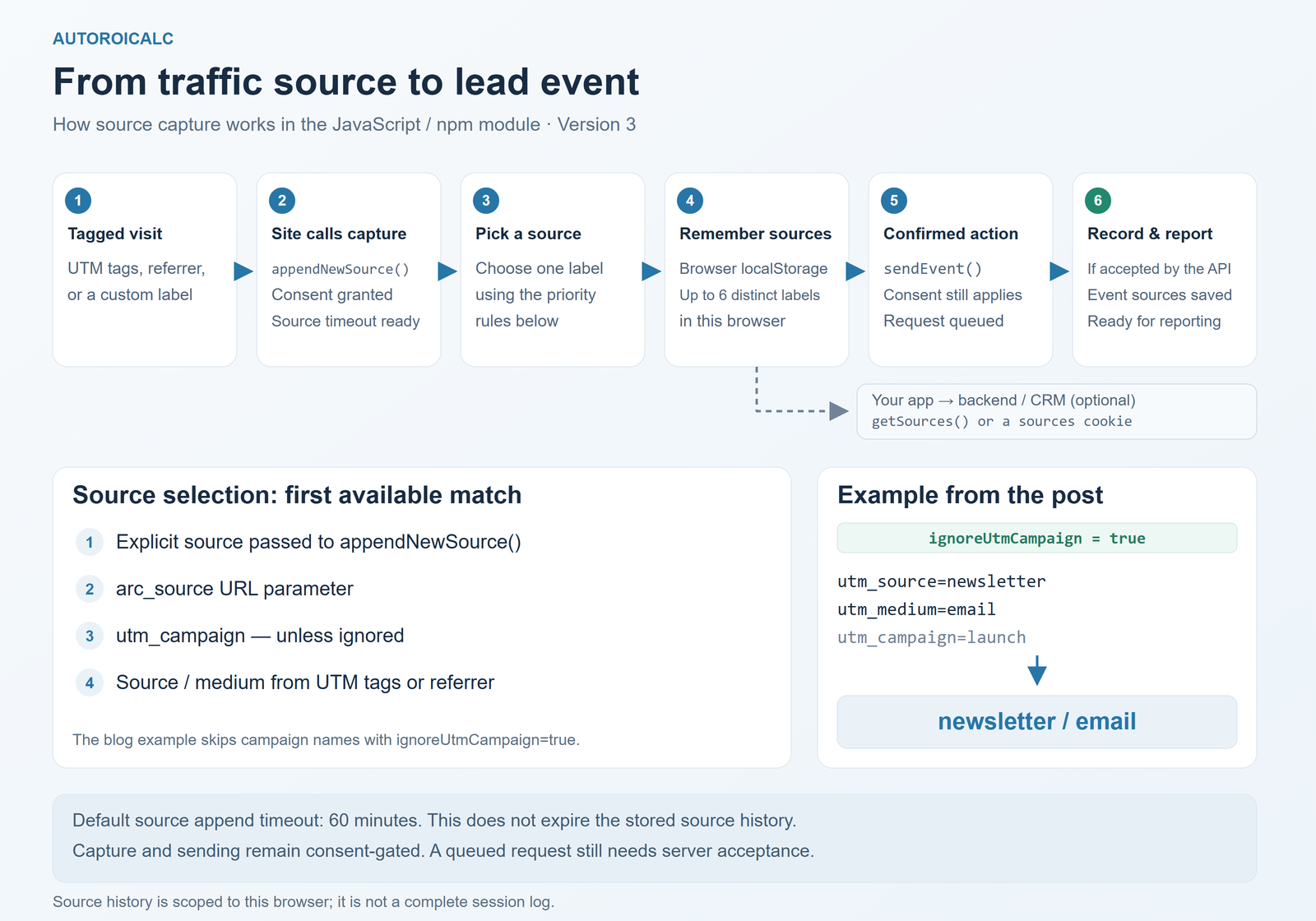
By default, automatic detection checks arc_source first, then utm_campaign, then the detected source or source/medium. An explicit source passed to appendNewSource() overrides automatic detection.
If you prefer labels such as newsletter / email or google / cpc, set ignoreUtmCampaign to true. This stops the campaign name from taking precedence; an arc_source override still wins. Use explicit UTM tags for campaign links.
https://example.com/pricing?utm_source=newsletter&utm_medium=email&utm_campaign=launchWith that configuration and an eligible source capture, this URL produces newsletter / email. With the default campaign setting, it produces launch.
A small npm setup
This example targets version 3. Copy your web events tracking ID from AutoROICalc Integrations. This is the collection ID, not a service token.
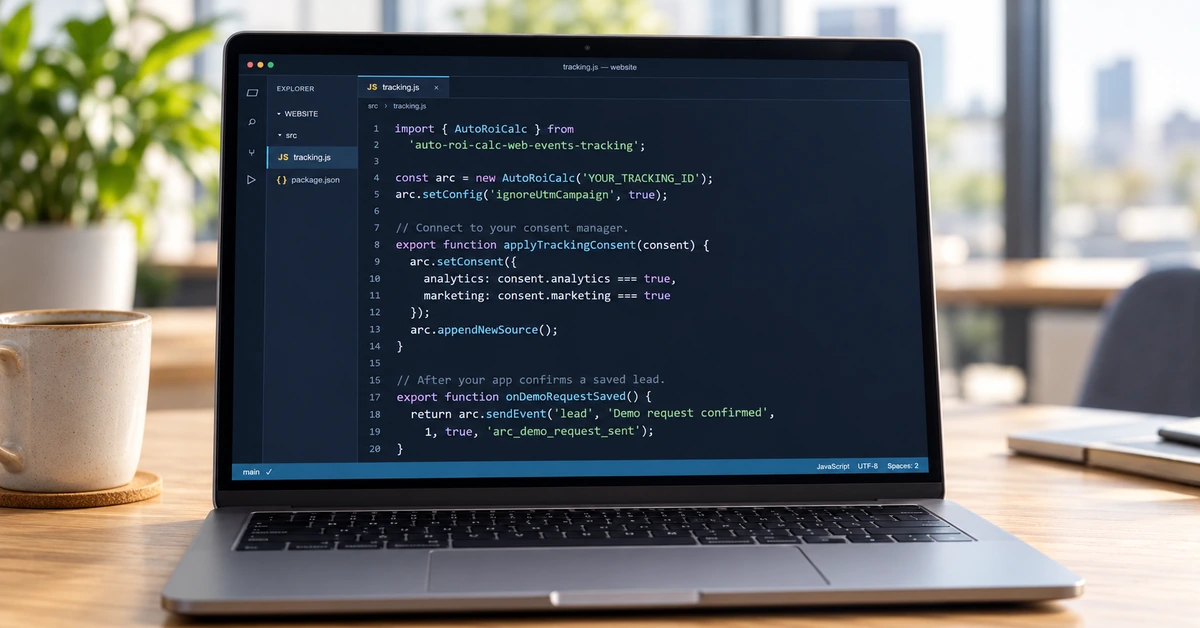
npm install auto-roi-calc-web-events-tracking@^3import { AutoRoiCalc } from 'auto-roi-calc-web-events-tracking';
// Initialize once in your browser application.
const arc = new AutoRoiCalc('YOUR_TRACKING_ID');
// Prefer source / medium labels over the utm_campaign label.
arc.setConfig('ignoreUtmCampaign', true);
// Connect this function to your consent manager on each page load
// and whenever the visitor changes their choices.
export function applyTrackingConsent(consent) {
arc.setConsent({
analytics: consent.analytics === true,
marketing: consent.marketing === true
});
arc.appendNewSource();
}
// Call after your application confirms the demo request was saved.
export function onDemoRequestSaved() {
return arc.sendEvent(
'lead',
'Demo request confirmed',
1,
true,
'arc_demo_request_sent'
);
}
// Optional: include this array in your application's lead payload.
export function getLeadSources() {
return arc.getSources();
}Wire applyTrackingConsent() to your consent manager, passing the visitor’s actual choices on each page load and whenever those choices change. Version 3 attribution defaults to denied. Call onDemoRequestSaved() after your application confirms success, rather than merely when someone clicks Submit.
The custom timeout key separates this event’s throttling from other event types. With the default timeout, the example suppresses another demo-request event in the same browser for 60 minutes. If every confirmed request should be counted, set the fourth sendEvent() argument to false. A true return means a request was queued, not that the server confirmed the record was saved.
Use the sources beyond the browser event
Call getLeadSources() when building your own lead payload. Its result might be ["newsletter / email", "google / cpc"] after those sources have been captured on eligible visits. Treat these as captured associations, not proof that every listed source caused the conversion.
Alternatively, arc.setSourcesCookie() writes the current list to the configured sources cookie for server-side access after consent. Keep source labels free of names, email addresses, and other personal details.
For a plain browser-script integration, use window.AutoRoiCalc in place of the npm instance. The same source methods apply.
Frequently asked questions
Which traffic source does the module capture?
An explicit source passed to appendNewSource() overrides automatic detection. Otherwise, the module checks arc_source, then utm_campaign, then the detected source or source/medium. Set ignoreUtmCampaign to true to prefer source/medium over the campaign name. An arc_source override still takes precedence.
Does this record every session or visitor?
No. By default, the module retains up to six distinct source labels in the browser. It does not create a complete visit log, session IDs, or cross-device identities. The default 60-minute source timeout limits capture frequency; it does not expire the stored history.
Can I use it without npm?
Yes. Load the version 3 browser script and use window.AutoRoiCalc instead of creating the npm instance. Configure the tracking ID, connect your consent manager, and call the same source and event methods.
Can I pass captured sources to my backend or CRM?
Yes. Read the source array with getSources() and include it in your application’s lead payload. Alternatively, setSourcesCookie() writes the current list to the configured sources cookie after consent. Your application still needs to handle the backend or CRM integration.
What happens when consent is withdrawn?
Supply the updated choices with both Analytics and Marketing disabled. Version 3 then blocks later attribution operations and returns an empty source list. Previously stored attribution is not automatically deleted; handle its cleanup through your site’s consent and retention process.
Start with one meaningful event, one consistently tagged campaign, and a report grouped by source. See the npm package documentation and the web event tracking guide for implementation details.